

Welcome to the Outsourced Pharma Capabilities Update Sponsor Portal.
Our goal is to ensure you have all the information you need to prepare a successful presentation. Please familiarize yourself with our list of FAQs below, our event team can assist with any additional questions you might have!
PLEASE NOTE
All materials must be submitted through the Materials Submission Form in the portal, rather than by email, to minimize copy/paste errors and version control issues.
The form will close after the final submission deadline. Any materials submitted or edited after that deadline cannot be accommodated, as our events team will be retrieving content, preparing it for the show, and conducting quality checks.
Please ensure all individuals responsible for submitting materials—including presenters—are informed of the final deadline well in advance.
If you receive a file size submission error for any materials, please reach out to Courtney Cornell at ccornell@vertmarkets.com for further instruction.
IMPORTANT DEADLINES
Company Info Due – April 29
Company name
Company logo
Company website
Description (short bio, 1–4 sentences)
Primary contact person information
-Name
-Email
Presenter Information Due – May 6
Name
-Title
-Email
-Headshot
Prerecord Window Opens & Presentation Details Due – May 18
Optional short abstract about presentation (1–2 sentences)
Related content for download from console - will use slide deck if nothing else submitted
Optional virtual background
Prerecord scheduled
Prerecord Window Closes and Final Materials Due – May 29
Slide deck (due before scheduled prerecord)
Optional poll question
Prerecord completed
PRESENTER MATERIALS
The Outsourced Pharma Capabilities Update is a free virtual event designed to help biopharma professionals find CDMOs with available capacity for their drug development and manufacturing needs.
The event highlights each CDMO’s specific capabilities and current openings, giving partner companies a platform to show how they can support biopharma pipelines more efficiently.
This format is a cost-effective, time-saving alternative to in-person meetings. Attendees prefer the ease of reviewing outsourcing options directly from their screens.
Who Should Attend?
- Professionals at pharma or biotech companies with active pipelines
- Industry consultants and investment firms
- CDMO presenters and sponsors
What’s Included with Your Sponsorship
As a presenting sponsor of the Outsourced Pharma Capabilities Update, you’ll receive:
- A 20-minute session to present your available capacity using slides, commentary, optional demos, and virtual tours
- A full list of event registrants with contact details (delivered within 1 week post-event)
- A list of audience questions from your session (within 1 week)
- Download data for your slides or alternate asset, with contact info (within 1 week)
- An optional poll you can create, with full response data (within 1 week)
- Logo and name placement in promotions and on-screen during the event
- A video cut of your presentation for your own use (delivered within 2 weeks)
- Meeting request facilitation to connect interested attendees with your team
Delivery Timeline:
- Registrant list, poll results, downloads, and questions – within 1 week
- Video cut – within 2 weeks
Event Duration:
- Each presentation: 20 minutes or less
- Entire event: Up to 2 hours total including intros, transitions, and closing
How Do Interested Viewers Register?
Anyone who is not presenting—such as clients, prospects, colleagues, or general attendees—must register through the event registration page. Registration remains open through the end of the event.
Will I Be On-Camera?
Yes. Presenters must be on camera.
Live or Pre-Recorded?
The event is 100% pre-recorded. This can be scheduled in your Materials Submission Form.
Can I Use a Video?
Yes, but only in supporting roles:
- Include a video (up to 4 minutes) within your 20-minute presentation if it directly shows facility/equipment/capacity.
- OR display it as your downloadable asset instead of your slide deck (attendees can watch it on their own time).
Note: Generic marketing videos won’t be approved—videos must focus on capacity/facility specifics.
How Many Speakers Can Present?
You may request multiple speakers (e.g., in different locations), but one speaker per company is standard.
Requests for multiple camera streams must be submitted by the "Presenter Info" deadline and are subject to platform availability.
What Should My Presentation Include?
Total time: 20 minutes
Focus: Current, available capabilities (not general company overviews)
Recommended Structure:
- Company Introduction
- 1–2 slides only
- Brief overview of who you are and what you offer
- PowerPoint Presentation
- Showcase available capacity:
- Volumes
- Facility locations
- Equipment
- Timelines
- Use the provided PowerPoint template from the Dropbox folder to ensure required fields are included
- Showcase available capacity:
- Facility Walk-Through or Virtual Tour
- Show real visuals of equipment, clean rooms, production areas, etc.
- Must support your capacity message (not a broad company promo)
What Should Be in My Slides?
Minimum content expectations:
- Overview of current capabilities
- Supported capabilities (e.g., fill/finish, analytical, packaging)
- Site location(s)
- Timeline availability
- Equipment and technology details
- Regulatory certifications
- Lead times, reliability, or scalability
- Supply chain resiliency
- Expertise and therapeutic areas
Use Arial, Calibri, Verdana, or Times New Roman.
Do not use custom fonts, timed transitions, or embedded videos.
Slides should be in 16:9 widescreen PPT format (not PDF).
Presentation Style Tips:
- Be enthusiastic and energetic
- Keep remarks transparent, candid, and human
- Avoid over-polishing—audiences prefer real and relatable
- Rehearse with your team beforehand, including any tech
Audience Interface Overview
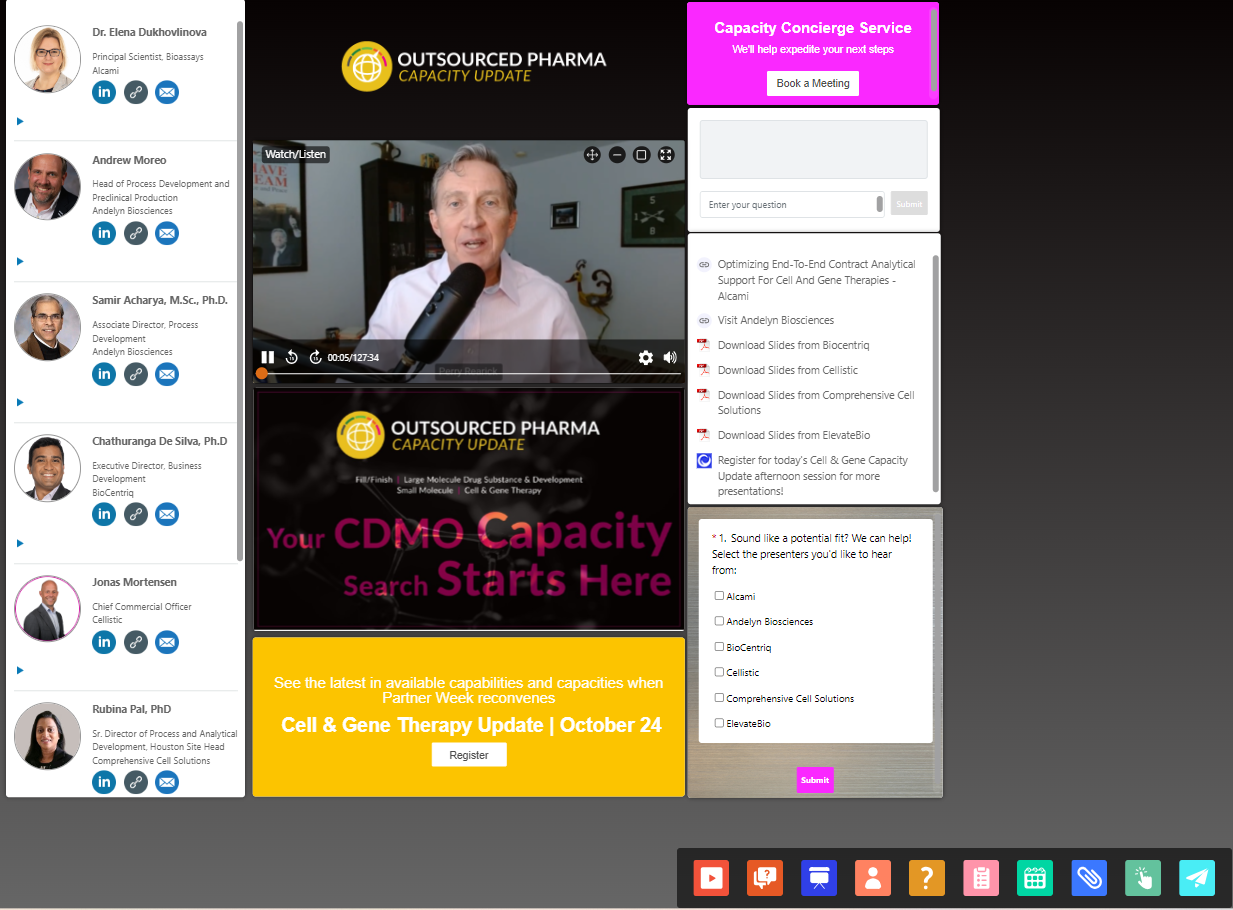
Attendees will view your presentation through an organized and interactive layout that includes the following components:
Media Player
Streams your video feed in real time. Audiences will see you speaking on camera alongside your presentation.
Slide Deck Window
Displays your PowerPoint slides as you advance through them live. Slides are synced with your video stream for a smooth experience.
Q&A Box
Allows attendees to submit live questions during your presentation. Questions are only visible to hosts, not other attendees. These will be sent to you as the event concludes to follow up with at your leisure.
Presenter Details and Contact Links
Shows your headshot, name, title, and company. Includes clickable links to:
- Send you an email
- Connect with you on LinkedIn
- Complete a static survey to indicate interest in hearing from you
- Company Information and On-Screen Asset
Lets attendees view your company description, website link, and access a downloadable asset (such as your slide deck, a video, brochure, or other related material
How Many Assets Can I Display?
Each presenting company can display one asset on-screen. You’ll receive post-event data showing who clicked on it.
What Should I Use as My Asset?
Most companies use a PDF of their slide deck, which performs best. Other options include:
- Short video
- Brochure
- Fact sheet
- White paper
- Relevant web page
Your asset should directly relate to the capacity topic of your presentation. If you don’t submit a different asset, the slide deck PDF will be used by default.
What Is the Optional Poll Question?
As a presenting company, you may include one optional poll question during your 20-minute segment. This gives you a way to engage viewers and gain personally identifiable insights about your audience. After the event, you’ll receive full poll results with contact details for each respondent.
What You’ll Need to Submit:
- Your poll question
- Response type (choose one):
- Multiple choice
- Select all that apply (up to 12 options)
- Free form (open text field)
- Answer options (if using multiple choice or select-all)
- Timing: Should the poll be pushed out right after your intro (default), or later? If later, specify when (e.g. “push results live after Slide 6”).
Tips for Crafting a Good Poll Question
Ask something:
- Easy and quick to answer
- Directly related to capacity
- That gives you useful insight into prospects
- That helps qualify leads (e.g. what they value in a CDMO partner)
Avoid overly salesy or generic questions.
Example Poll Questions:
- What’s your biggest challenge in securing manufacturing capacity?
- When do you anticipate needing new capacity for your current pipeline?
- Which service area are you most actively sourcing right now?
When & How to Submit
Poll questions must be submitted via the Materials Submission Form in your presenter portal by the final Presentation Materials deadline.
How the Poll Appears
The poll will pop up in a small, moveable window during your presentation. It won’t interrupt the audio/video stream. For better response rates, your speaker should briefly mention the poll and encourage viewers to participate.
When Will You Get the Results?
Poll results, including contact info for respondents, will be delivered within one week post-event.
Required Equipment for Presenters
Basic Setup (Required):
- A strong, reliable internet connection
- Laptop or desktop computer
- Built-in or external webcam
- Built-in microphone or wired earbuds/headphones (do not use Bluetooth/wireless audio)
- Google Chrome browser
- PowerPoint slides in .ppt/.pptx format (not PDF)
- On24 must be whitelisted on your network firewall
Live Walk-Through or Tour (Optional, but Recommended)
If you plan to include a facility tour or live visual of your equipment setup, here are options for making it work:
Option 1: Laptop + Webcam Setup
- Use a laptop on a mobile cart with a wired external webcam (e.g., Logitech BRIO)
- Stabilize your webcam with a grip or tripod (e.g., Joby GorillaPod)
Option 2: Hire a Video Professional
- Rent equipment or hire a production company to stream the walkthrough
- Rental kit examples:
- Questions? Email live director Miles Szkoda at mszkoda@vertmarkets.com
Presentation Environment
Recommended Location:
- In front of relevant equipment/facilities (ideal)
- Or a clean, quiet setting with a branded physical banner or virtual background
(Virtual backgrounds must be submitted by the materials deadline)
Special Note:
If you’ll be presenting in a noisy location, request an audio test as early as possible to confirm sound quality.
Pre-Record session (Required for All Presenters)
What It Is:
A recording of your presentation to be shown on the day of the event. We do not allow any edits to be made after the recording concludes unless in extreme emergency.
When & How:
- Scheduled 2-4 weeks before the event
- Options listed in the Materials Submission Form
- First-come, first-served
- Support staff may attend but aren’t required
Event Platform
- Platform Used: On24
What If Something Goes Wrong?
Before the Event (more than 30 minutes out):
Email Miles Szkoda at mszkoda@vertmarkets.com
During the Event (or within 30 minutes of it):
- Try to use the team chat inside On24
- If disconnected or unable to resolve:
- Email Courtney Cornell at ccornell@vertmarkets.com
- Miles and Courtney will be monitoring email and chat to assist
Who Will the Event Be Promoted To?
- Life Science Connect’s database of biopharma professionals and decision-makers
- Targeted LinkedIn members relevant to drug development and outsourcing
- Clients and prospects you choose to promote to directly
How Will the Event Be Promoted?
The Outsourced Pharma team uses the following channels:
- Official websites
- Email marketing campaigns
- Social media
- E-newsletters
You're encouraged to mirror this approach to maximize exposure.
What Should I Do as a Presenting Company?
You're not required to promote the event yourself, but it’s recommended—especially if you want specific prospects to attend your session. Here’s how and when:
- Start early, but ramp up during the two weeks leading up to the event, when registrant traffic peaks
- Use all available assets to share across LinkedIn, email, and your company site
What Promotional Materials Are Provided?
Once your speaker details are submitted, you’ll receive access to promo image featuring your speaker(s).
If you need additional materials like:
- Custom-sized banners
- Personalized HTML email templates
- Custom graphics for social
...you can request them by emailing ccornell@vertmarkets.com with your desired size, format, and content.
Materials and Details Required for Participation
All materials must be submitted through the Materials Submission Form in the event portal.
Company Info: (7 weeks out)
- Company name
- Company logo
- Company website
- Description (short bio, 1-4 sentences)
- Primary contact person information
- Name
Presenter Information: (6 weeks out)
- Name
- Title
- Headshot
Prerecord window opens: (4 weeks out)
Presentation Details: (3 weeks out)
- Short abstract about presentation (1-2 sentences)
- Format
- Related content for download from console
- Will use slide deck if nothing else submitted
- Optional virtual background
- Prerecord scheduled
Prerecord window closes and Final materials due: (2 weeks out)
- Slide deck (due before scheduled pre-record)
- Optional poll question
- Optional virtual background
- Prerecord completed
PowerPoint Requirements
- Format: 16:9 widescreen
- Do not use custom fonts. Recommended: Arial, Calibri, Verdana, or Times New Roman
- No embedded videos
- No timed transitions
- Do not submit as PDF
Deadlines and Submission Details
- All items must be submitted by the deadlines listed in the Materials Submission Form
- The form will close after the deadline. Late materials are not guaranteed to be included
- If your file exceeds the upload size limit, use WeTransfer, Dropbox, or a similar service
- Contact Courtney Cornell at ccornell@vertmarkets.com with questions or issues
How to View the Event Post-Show
The event will be digitally archived and made available on On24 within approximately 24 hours after the live event concludes.
- If you registered as an audience member, you will receive an email the day after the event with a link to access the presentations.
- If you did not register in advance or if you were a presenter, you can still access the on-demand event by registering via the link at the top of this page under Registration & Event Access.
- Approximately three weeks post-event, all presentations will be available on the Outsourced Pharma Capabilities Update archive page.
If you need help accessing the archived event, email Courtney Cornell at ccornell@vertmarkets.com.
Promoting the Event Post-Show
Presenting sponsors are encouraged to promote the on-demand event using the following methods:
- Share on LinkedIn:
Visit the Outsourced Pharma LinkedIn page, click “Show all events,” find your past session, click “Share,” and follow the prompts. - Share the Registration Page:
Go to the registration page for the session(s) your company presented in. Right-click the gold access button to copy the URL and share it with your audience starting 24 hours after the event ends. - Share Your Video Cut:
Once you receive your individual video cut (typically within two weeks post-event), download it and upload it to your company’s website, social media channels, YouTube, or any other platform. - Share from the Event Archive Page:
After about three weeks, your video will appear on the Outsourced Pharma Capabilities Update page. Right-click your video cut and copy the link address to use in emails, social media, or internal communications.